

Symptoms
When attempting to deploy a Declarative Lookup Rollup Summary (DLRS) trigger on a Kulturra object (such as the Payment Profile object), the deployment fails and returns an error similar to the following:
Error: dlrs_fw1_PaymentProfileTest.testTrigger System.DmlException: Insert failed. First exception on row 0; first error: FIELD_CUSTOM_VALIDATION_EXCEPTION, Payment Center Settings has not been setup, please go to Payment Center Settings Tab and click the button to add Settings.
Cause
When you deploy a new DLRS configuration, the DLRS package automatically generates an Apex test class to validate the trigger. However, Kulturra requires a default Payment Center Settings record to exist for transactions to process correctly. Because the auto-generated DLRS test class does not create this required setting record, the test fails, preventing the deployment.
Resolution
To resolve this issue, you must modify the auto-generated test code within the DLRS configuration to insert the required default settings before the test runs.
Navigate to your DLRS configuration record.
Copy the auto-generated line from the Deploy Code section.
JavaScript// Force the dlrs_fw1_PaymentProfileTrigger to be invoked, fails the test if org config or other Apex code prevents this.
        dlrs.RollupService.testHandler(new fw1__PaymentProfile__c());
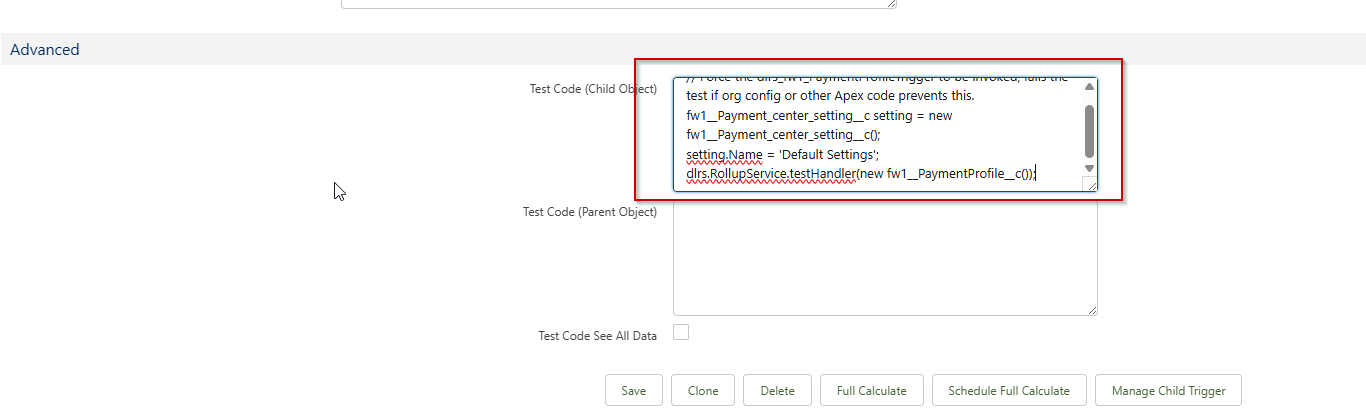
Scroll down to the Advanced section (this allows you to append custom code to the auto-generated test class).
Replace the existing code in the Advanced test code box with the following snippet:
Apex
JavaScript// Force the dlrs_fw1_PaymentProfileTrigger to be invoked, fails the test if org config or other Apex code prevents this.
fw1__Payment_center_setting__c settings = new fw1__Payment_center_setting__c();
settings.Name = 'Default Settings';
insert settings;
dlrs.RollupService.testHandler(new fw1__PaymentProfile__c());
Save the changes to the DLRS record.
Go back to Manage Child Trigger and click Deploy again. The deployment should now pass successfully.