

Symptoms
When attempting to process a Partial Refund for a payment, users may encounter an error preventing the transaction from completing successfully.
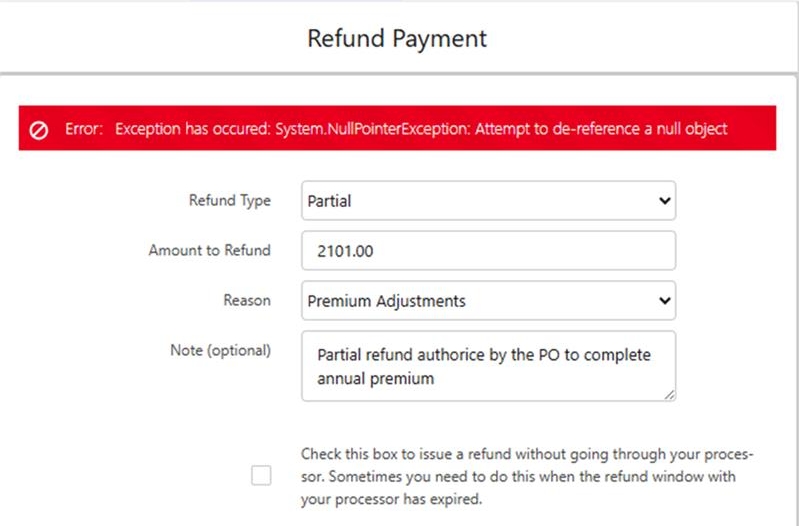
Cause
This issue typically occurs when the payment record is flagged as an advance payment, but the unallocated funds have not been specified. Specifically, this happens if:
The Advance Payment checkbox (
fw1__Is_Advance_Payment__c) is checked (set to true).The Unallocated Amount field (
fw1__Unallocated_Amount__c) is left blank.
Resolution
To resolve this issue and successfully process the partial refund, you must adjust the payment record using one of the two following methods:
Option 1: Deactivate the Advance Payment Flag
Navigate to the affected Payment record in Salesforce.
Uncheck the Advance Payment (
fw1__Is_Advance_Payment__c) checkbox so the payment is no longer treated as an advance payment during the refund process.Save the record and retry the partial refund.
Option 2: Populate the Unallocated Amount
Navigate to the affected Payment record in Salesforce.
Enter the correct value into the Unallocated Amount (
fw1__Unallocated_Amount__c) field.Save the record and retry the partial refund.
Best Practice Tip: If this payment originated from a custom payment link or an automated process, we highly recommend reviewing your custom logic or Salesforce Flows. Ensure that your automation is not incorrectly checking the Advance Payment field by default when it is not applicable.