

Logo

How can we help you?

Search our knowledge base to get answers to your questions, access video training & more!

Troubleshooting Deployment Issues Caused by Kulturra Triggers

Troubleshooting Deployment Issues Caused by Kulturra Triggers

Deploying code in Salesforce can occasionally become challenging, especially when certain triggers within Kulturra interfere with the process. Since debug logs cannot be enabled during deployment, it becomes difficult to identify which specific trigger is causing the failure.A practical workaround is to temporarily disable selected triggers through Payment Center Trigger Settings, complete the deployment, then capture debug logs afterward to confirm which automation needs attention.Below are the steps to disable triggers safely:

Last updated on 18 Aug, 2026

How to Disable Payment Center Triggers

1. Open Setup

Navigate to Setup in Salesforce.

2. Search for Custom Settings

Use the Quick Find search box and look for Custom Settings.

3. Open Payment Center Trigger Settings

Locate and select Payment Center Trigger Settings.

4. Click Manage

Inside the custom setting, click Manage.
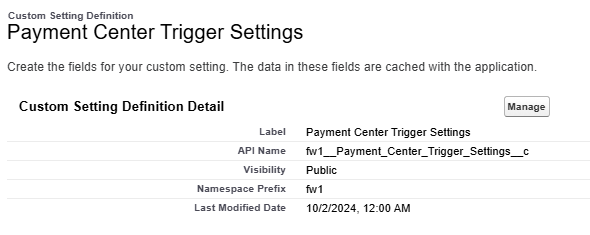
image.png

5. Create a New Setting

Click New to create a new configuration.
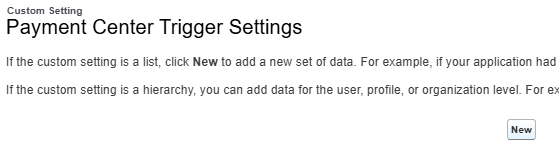
image.png

6. Select the Profile and Trigger to Disable

Choose the appropriate User Profile and select the Trigger Name you want to disable for deployment.
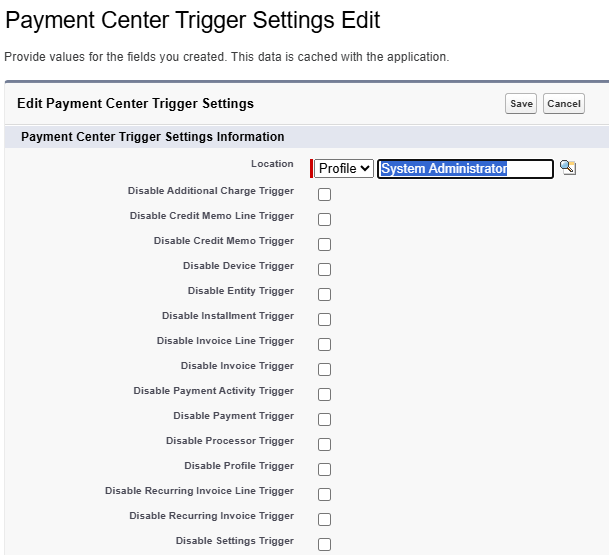
image.png

After Deployment

Once the deployment is completed, you may re-enable the triggers as needed and capture debug logs to determine the root cause of any failing automation.

Did you find this article helpful?
Previous

Reminders

Next