

Before setting up the scheduled sync, make sure you are using the latest version of Apphesive:
Apphesive v8.6: https://login.salesforce.com/packaging/installPackage.apexp?p0=04t1K000002QFDT
Overview
The ExchangeRateRetrieverBatch class is responsible for:
Fetching the latest exchange rates from QuickBooks.
Updating corresponding records in Salesforce.
Running automatically on a defined schedule.
This eliminates the need for manual updates and ensures consistency across integrations.
Scheduling the Job
You can schedule the exchange rate sync using Salesforce Execute Anonymous window.
Sync for All QuickBooks Accounts
To run the synchronization daily at 6:00 AM:
JavaScriptString cron = '0 0  6  * * ?' ;
System.schedule('Exchange Rate Sync Batch', cron, new fw8.ExchangeRateRetrieverBatch());
Sync for a Specific QuickBooks Account
If you need to limit the sync to a single QuickBooks connection, pass the connection ID when scheduling:
JavaScriptString cron = '0 0  6  * * ?' ;
System.schedule('Exchange Rate Sync Batch', cron, new fw8.ExchangeRateRetrieverBatch(<your quickbooks connection Id>));
Cron Expression Explained
The cron expression used:
JavaScript0 0 6 * * ?Represents:
0seconds0minutes6hours (6:00 AM)*every day of the month*every month?no specific day of the week
Alternative Way to Schedule the Job
If you prefer, you can schedule the job directly through Salesforce without using code.
Go to Setup
In the Quick Find box, search for Apex Classes
Select Schedule Apex
In the Apex Class field, search for and select ExchangeRateRetrieverBatch
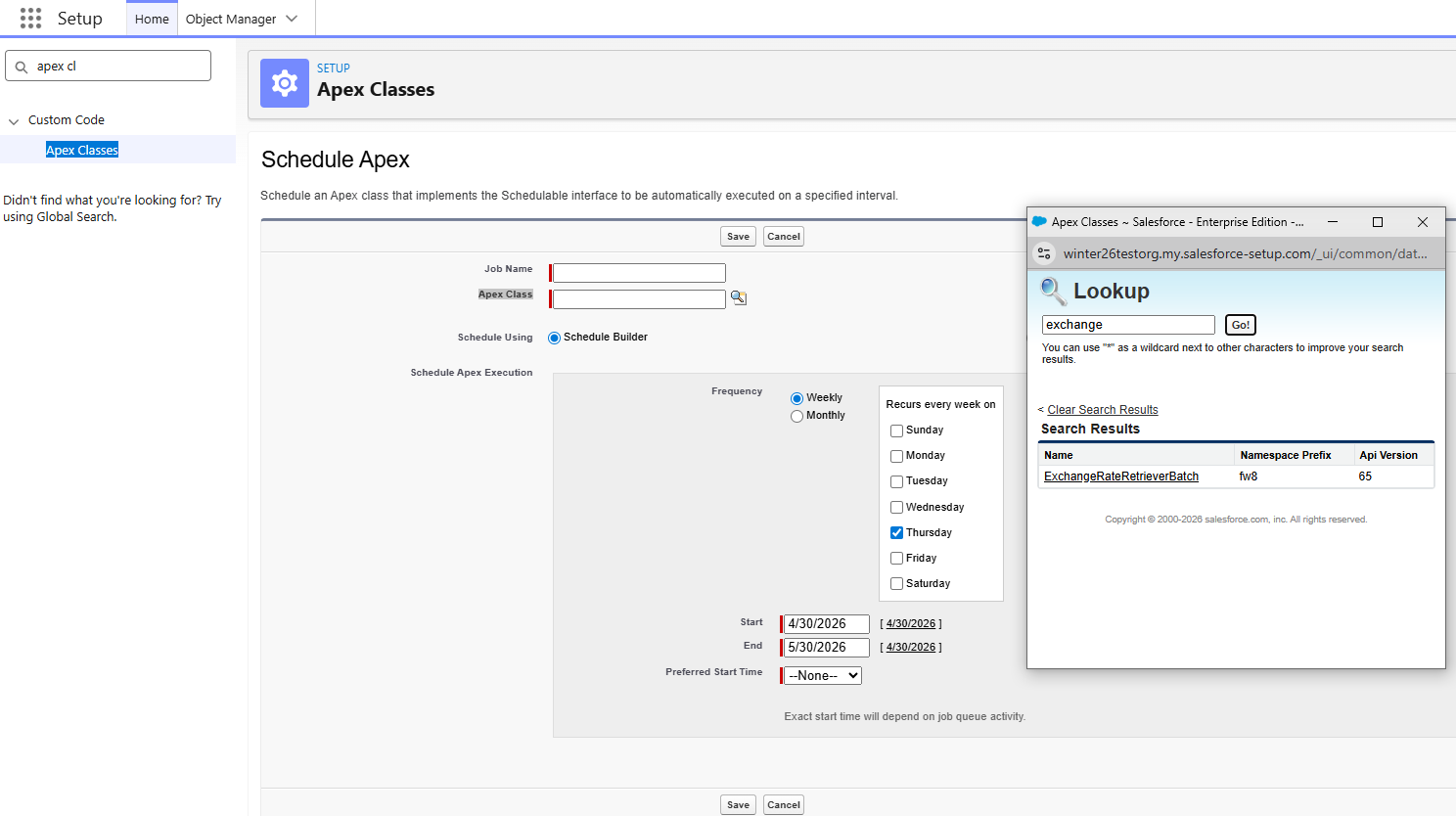
Choose your desired frequency and timing
Click Save.
Monitoring and Validation
After scheduling the job:
Navigate to Setup > Scheduled Jobs to confirm it has been created.
Check Apex Jobs for execution status and any failures.
Review logs if exchange rates are not updating as expected.
Best Practices
Schedule the job during off-peak hours (e.g., early morning) to reduce system load.
Validate QuickBooks connection IDs before scheduling targeted runs.
Avoid creating duplicate scheduled jobs.
Periodically review job history to ensure consistent performance.